


A while back, I did a post on my "Daily
5ish." I called it Daily 5ish because it's definitely a modified version
of the Daily 5- I tweaked it to fit the needs of my kids, as well as what was working best for us in our classroom, and our time frame. You can read more about
my Daily 5ish and see some pictures {HERE}!
I basically rotate the kids through stations, in flexible groups based
on their needs and levels. The groups are always changing, so I needed a
quick and easy way to manage this. I also needed a visual way to let the kids
know where they were supposed to be and what they were supposed to be doing. Here’s
what I came up with:

Here are some things I should tell you about our Daily 5:
-The green stars have music transitions linked to them. When you click
them, a song plays letting the kids know it’s time to clean up that station, or
it’s time to move to the next station.
-The kids’ names are either red or blue. On even days, red kids get to
sit in the classroom library, and on odd days blue kids get to sit in the classroom
library. This is to keep it real fair.
-The iPad pictures let the kids know they are (or are not) supposed to
bring their iPad with them to that station (We are lucky enough to have 1:1 iPads!)
-We usually only get to 3 stations in one day- 4 on a great day. We just
pick up where we left off the next day.
-We rotate between listening and word work because there just isn’t
enough time (story of my teaching life!!!) Once every group listens, then every
group does a specific word work activity, and we switch continuously.
-There is no writing rotation because I do an hour writing block in the
morning with my students.
-The boxes with the kids’ names are movable- after we’re done with a
station, I have a helper rotate the boxes clockwise.
After the original Daily 5ish post, I got LOTS of emails asking to share the SMART file. And
I’m happy to do that!
Here’s a SMART board version for you (Click HERE or on the pic below). This is very basic- there's no
clipart included or music transitions in this file because it is copyrighted,
so I’m not able to share that with you. {So sorry!} You could always add your own, though!!! (I got
the clipart in the original file from Scrappin’ Doodles.) All you need to do is
add your student’s names and you’re good to go!
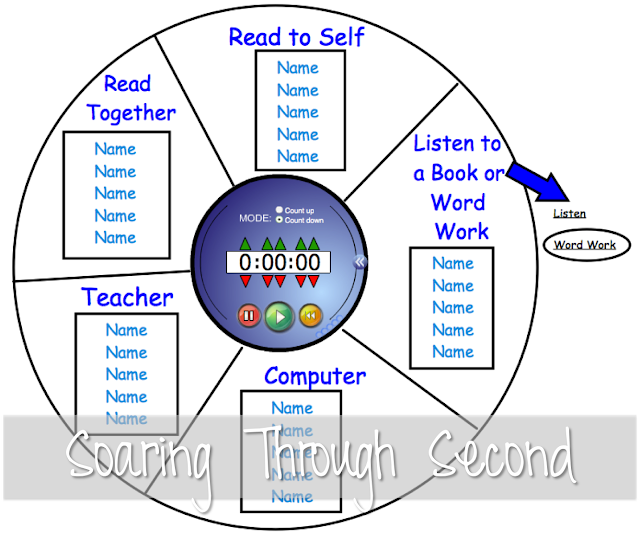
***You MUST have SMART Notebook software in order to open and view this
file. If you don’t, it won’t work!
If you need help adding music to the SMART Board file for transitions,
you can watch a tutorial I did {HERE}.
Here’s a PowerPoint version for you to edit as well (click HERE or on the picture below)- this one does have
the cute clipart (no music), but it does not have the timer in the middle (since
that’s a SMART Notebook software thing…) Again, you’ll need to add your student’s
names and you’re golden.

***You MUST have PowerPoint in order to open and view this file. If you
don’t, it won’t work!
If you download, please leave me some love- I’d love to hear how you
plan on using it in your classroom! Also, if you have a blog post or advice on how Daily 5 works in your classroom, please leave a link in the comments!!!
Update August, 2017
I am so excited to have gotten so many emails from so many people asking about these rotation management systems!
I also know that many people don't have either SMART Notebook file software or PowerPoint to download the files.
And with lots of people and school districts moving towards Google Classroom, I decided to create an easy-to-use Learning Rotations Center Management System compatible with Google Slides! You just add all of your info and you're good to go! You can even add any length of timer from YouTube!
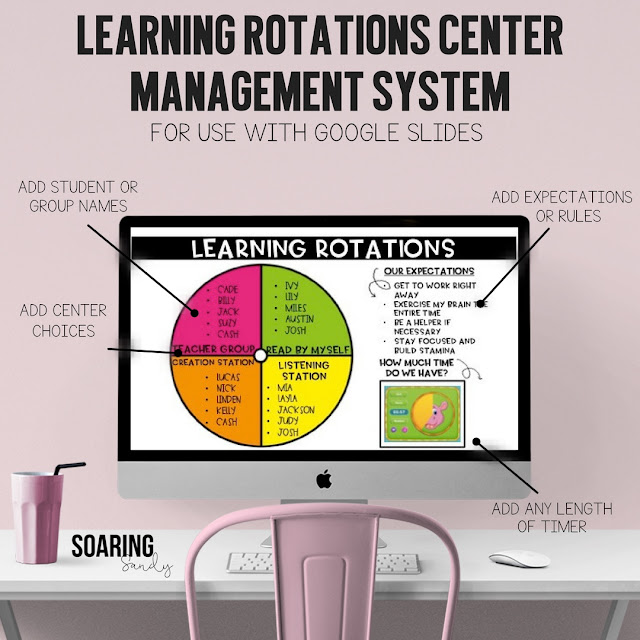
You can check them out in my Teachers Pay Teachers store if you'd like!


