Showing posts with label language arts. Show all posts

Currently, Book Club, & Statement or Question Center

Happy July!!!!

This summer is already flying by! Here's what I'm up to at the moment...


(Make sure to link up with Farley too!!!) 

I can't believe this little guy slept for six hours last night!!! I feel GREAT this morning because I got some sleep too!!! 


I am REALLY wanting to go to Vegas this year, but it just wasn't in the cards for me. I'm going to have to stay off social media from the 9th-12th #fomo :-( 
Please have a drink for me! 
I'm already planning for next year!!! 

For the 4th this year, we'll be doing the usual BBQ and fireworks with family (which I LOVE!) Hubby's parents live up on a hill, so from their house we can see at least five or six sets of fireworks down the coast! 

I'm so excited to be joining in on Ramona Recommend's July book club! 


I'm so excited to read Wonder- it's been on my "to-read" list forever! And Giraffes Can't Dance is one of my FAVORITE picture books!!!!!! Head on over to Lessons Learned to join in on the fun! 

Photobucket
And I've {finally} uploaded my Sentence or Question Center to TPT

If you use Wonders (or not), this aligns with Unit 1, Week 1 grammar skill. (You don't have to be using Wonders to enjoy this center though!) Use it as a scoot or sort! Everything is included- answer keys, recording sheets, student directions, teacher directions, & two sets of cards (one with punctuation & one without). I'll be using this the first few weeks of school for one of my Word Work Daily 5 stations. 


8

Learning Rotations | Center Management Made Easy


Manage centers and rotations for any part of your day easily with this template! Downloadable management systems for SMART Notebook, PowerPoint, and Google Slides.

A while back, I did a post on my "Daily 5ish." I called it Daily 5ish because it's definitely a modified version of the Daily 5- I tweaked it to fit the needs of my kids, as well as what was working best for us in our classroom, and our time frame. You can read more about my Daily 5ish and see some pictures {HERE}!

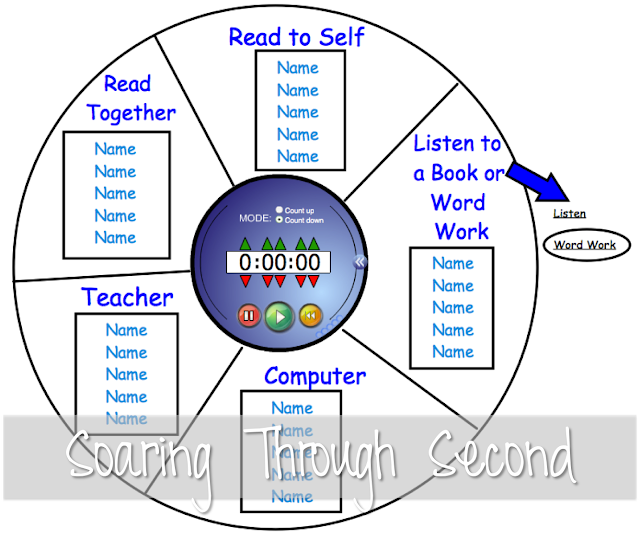
I basically rotate the kids through stations, in flexible groups based on their needs and levels. The groups are always changing, so I needed a quick and easy way to manage this. I also needed a visual way to let the kids know where they were supposed to be and what they were supposed to be doing. Here’s what I came up with:

Manage centers and rotations for any part of your day easily with this template! Downloadable management systems for SMART Notebook, PowerPoint, and Google Slides.

Here are some things I should tell you about our Daily 5:

-The green stars have music transitions linked to them. When you click them, a song plays letting the kids know it’s time to clean up that station, or it’s time to move to the next station.

-The kids’ names are either red or blue. On even days, red kids get to sit in the classroom library, and on odd days blue kids get to sit in the classroom library. This is to keep it real fair.

-The iPad pictures let the kids know they are (or are not) supposed to bring their iPad with them to that station (We are lucky enough to have 1:1 iPads!) 

-We usually only get to 3 stations in one day- 4 on a great day. We just pick up where we left off the next day.

-We rotate between listening and word work because there just isn’t enough time (story of my teaching life!!!) Once every group listens, then every group does a specific word work activity, and we switch continuously.

-There is no writing rotation because I do an hour writing block in the morning with my students.

-The boxes with the kids’ names are movable- after we’re done with a station, I have a helper rotate the boxes clockwise.

After the original Daily 5ish post, I got LOTS of emails asking to share the SMART file. And I’m happy to do that!

Here’s a SMART board version for you (Click HERE or on the pic below). This is very basic- there's no clipart included or music transitions in this file because it is copyrighted, so I’m not able to share that with you. {So sorry!} You could always add your own, though!!! (I got the clipart in the original file from Scrappin’ Doodles.) All you need to do is add your student’s names and you’re good to go!

Manage centers and rotations for any part of your day easily with this template! Downloadable management systems for SMART Notebook, PowerPoint, and Google Slides.

***You MUST have SMART Notebook software in order to open and view this file. If you don’t, it won’t work!

If you need help adding music to the SMART Board file for transitions, you can watch a tutorial I did {HERE}.

Here’s a PowerPoint version for you to edit as well (click HERE or on the picture below)- this one does have the cute clipart (no music), but it does not have the timer in the middle (since that’s a SMART Notebook software thing…) Again, you’ll need to add your student’s names and you’re golden.


Manage centers and rotations for any part of your day easily with this template! Downloadable management systems for SMART Notebook, PowerPoint, and Google Slides.


***You MUST have PowerPoint in order to open and view this file. If you don’t, it won’t work!

If you download, please leave me some love- I’d love to hear how you plan on using it in your classroom! Also, if you have a blog post or advice on how Daily 5 works in your classroom, please leave a link in the comments!!! 


Update August, 2017


I am so excited to have gotten so many emails from so many people asking about these rotation management systems! 


I also know that many people don't have either SMART Notebook file software or PowerPoint to download the files. 


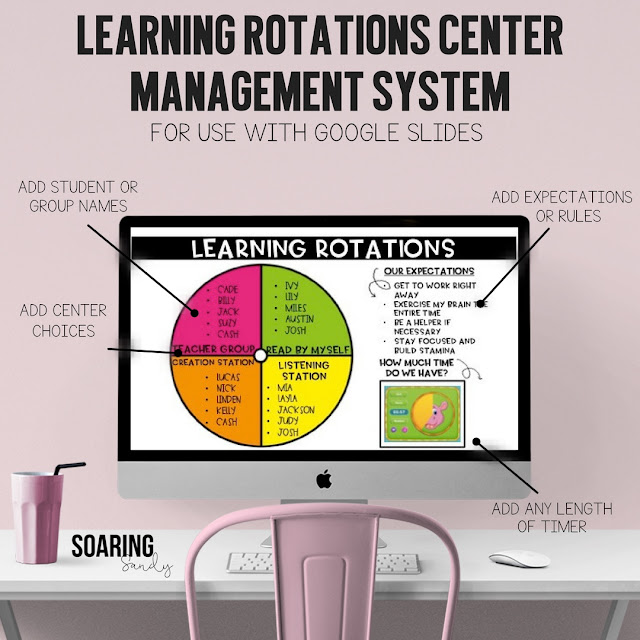
And with lots of people and school districts moving towards Google Classroom, I decided to create an easy-to-use Learning Rotations Center Management System compatible with Google Slides! You just add all of your info and you're good to go! You can even add any length of timer from YouTube! 


Manage centers and rotations for any part of your day easily with this template! Downloadable management systems for SMART Notebook, PowerPoint, and Google Slides.

You can check them out in my Teachers Pay Teachers store if you'd like! 


10

My Daily 5-ish

I'm so excited to share a quick overview of my version of Daily 5{ish} with you today! It's taken me awhile because {I think} I've finally figured out (and it's only the end of the year, right), what works for me and my kids {right now!}. It's been an ever changing system, as I tweaked and figured out with the kids what works best, what keeps the flow going, and is simple for us all to manage! So here it is...


I start our reading block off with a fluency read. You can read more about that {HERE}. Then I do a quick mini lesson, depending on what our story is and what we're working on that week. (I should tell you- we use HM- it's as old as dirt as far as I'm concerned...So I do my best to squeeze other texts and stories and nonfiction in!) 

Then we head off to our rotations... 

The green stars on the chart have music linked to them- one song plays when it's time to clean up, and the other is for when it's time to "Move It" to the next station. 

The red and blue names are because we only have three seats in our classroom library, so the kids rotate so it's fair.


I should also tell you, I don't (usually) see all of the groups in one day. That means the kids go to 3-ish (4 on a good day) rotations. We just pick up where we left off the next day. And continue on as the week progresses. 


Each station has "Must Dos" and "May Dos". I use picture frames from the Dollar Store to manage these! So, there's an assignment the kids "Must Do" before they can move to their "May Dos."


The teacher table is where our guided reading groups happen. We use our iPads to access Raz Kids (which means there's no printing or copying or assembling any guided reading books for me! This has saved me a tremendous amount of time!!! Love!) We also do technology projects here, as well as lots of reading response and comprehension activities. I'll post more on what my guided reading groups look like- soon-ish. ;-) 

Read together is where (YOU GUESSED IT!!!)- the kids read together! The kids are supposed TO sit side by side on the crates I made over the summer! The "Must Do" is usually always to read the story from our basal (HM) reader that we're working on that week. ***This is the station that I've had the MOST trouble with. I'm constantly reminding kids what they need to be doing. To trouble shoot for next year, I'll spend even more time going over procedures, and I've been stocking up on books in doubles from Scholastic.***


(I made them pose for this picture- that's what it should look like. Usually they're either picking their noses, arguing, or rolling around on the floor...) 

Read to self is where the kids get to read independently. Kids are allowed to read on their iPads in iBooks, or regular books from the library. I've found they love to do both!


Listen & word word are combined because I just couldn't fit it all in. All of the groups do word work, and once they've all done the word work "May Do", we switch to listening. The listening "Must Do" is usually to listen to the story we're working on that week. The kids favorite "Must Do" for word work is always a scoot for whatever we're working- they love being out of their seats and moving around the classroom with their clip boards as often as possible, and I find they are most on task doing these type of activities! 

(Using iPads for listening!) 

And finally, on the computer we use Raz Kids or BrainPop Jr., again depending on what we're focusing on that particular week. 


The timer in the middle keeps all of us on track and accountable for the time I spend with my guided reading groups. We usually spend between 15-20 minutes at each station. 

Here's a picture of us ALL on task! (A rare moment indeed ;) 


I should mention I don't include a writing rotation, because we do a writing block for an hour before we begin our Daily 5 each day! :) 


Like I said, this has been a work in progress as this is my first year attempting to implement Daily 5-ish. I have to say, the kids love it, and I love it because I've seen SO much progress in my kiddos and their reading!!!! Our guided reading groups are one of my favorite parts of our day!   


I'd love to hear about your reading block! Do you Daily 5-ish? :) 


20